The era of “experimenting” with AI video is over. In 2026, AI video generation has matured into a core production requirement for brands that want to stay relevant in an algorithmic world. Whether you are scaling short-form content for TikTok or producing high-fidelity cinematic ads, the right AI video generation tools can now turn a single text prompt into a social-ready masterpiece in seconds.
But with a surge of new players like OpenAI’s Sora 2 and Google’s Veo 3.1 hitting the market, the challenge isn’t finding a tool; it’s finding the one that fits your specific workflow. High-performing AI videos require more than just a cool visual; they need character consistency, brand safety, and seamless distribution.
In this guide, we’ve tested and ranked the top 10 platforms for AI video creation to help you choose the generator that will actually move the needle for your brand’s AI in social media strategy.
The easiest way to manage and grow your social channels.
Try ContentStudio for FREE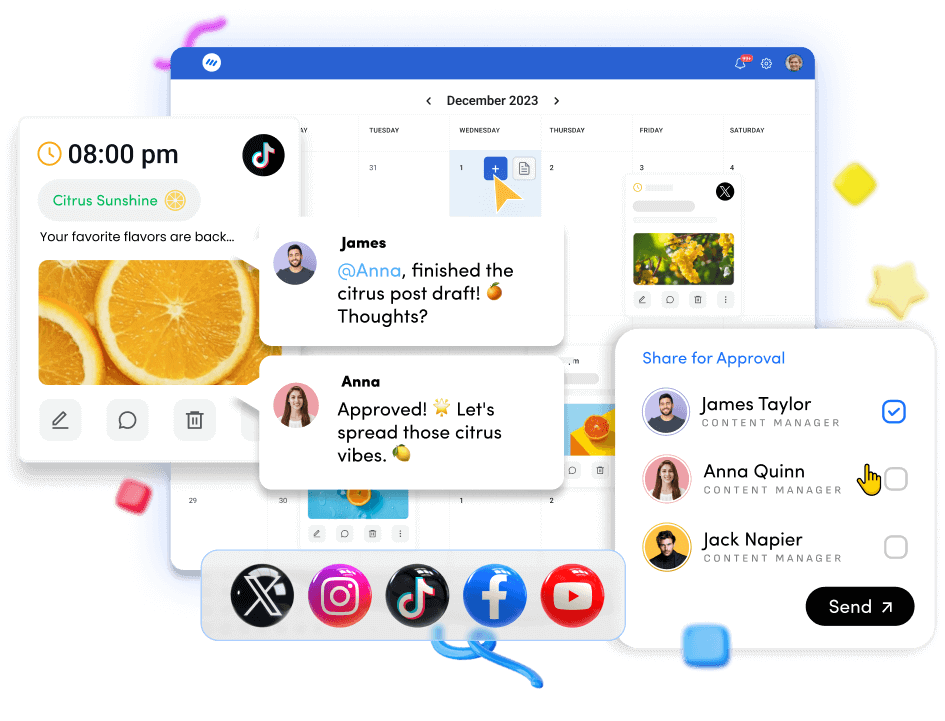
What makes a good AI video generator?
Ease of use
A good AI video generator should make video creation simple and accessible, even for beginners. An intuitive interface, drag-and-drop editing, and ready-made templates allow users to turn ideas or scripts into videos within minutes without needing advanced editing skills.
High-quality video output
Quality is a major factor when choosing an AI video generator. The platform should produce clear visuals, smooth transitions, and professional-looking videos suitable for platforms like YouTube, Instagram, and TikTok. Support for HD or high-resolution output ensures your content maintains a polished and professional look.
Customization and creative control
The best AI video generators allow users to customize their videos according to their brand style. This includes adding logos, adjusting colors, editing scenes, modifying captions, and incorporating voiceovers so the final video aligns with your brand identity and messaging.
AI-powered features
Modern AI video generators go beyond basic editing by offering smart capabilities such as text-to-video conversion, automated subtitles, AI-generated visuals, and voice generation. These features help users create engaging videos faster while reducing manual editing work.
Check out: ContentStudio’s AI video generator
Versatility for different use cases
A strong AI video generator should support multiple content formats, including marketing videos, social media clips, tutorials, product demos, and promotional ads. This flexibility allows creators, marketers, and businesses to produce diverse video content from a single platform.
How AI video generators benefit marketers
Video has become one of the most powerful formats in digital marketing, but producing it traditionally can be expensive, time-consuming, and resource heavy. That’s where AI video generators step in. They make it easier for marketers to create high-quality videos quickly, without needing advanced editing skills or large production teams.
Here’s how AI video generators are helping marketers work smarter and scale their content efforts.
1. Faster content production
AI video generators dramatically reduce the time it takes to create videos. Instead of spending days scripting, filming, and editing, marketers can turn a simple prompt, blog post, or script into a finished video within minutes. This speed allows teams to publish content more frequently and keep up with the fast pace of social media.
2. Lower production costs
Traditional video production often requires cameras, editors, studios, and talent. AI video tools eliminate many of these costs by automating the process. Marketers can generate professional-looking videos using templates, AI avatars, stock visuals, and voiceovers—making video marketing far more budget-friendly.
3. Easier content repurposing
Marketers can quickly turn existing content—such as blog posts, newsletters, or social media threads into engaging video formats. This helps extend the life of existing content while reaching audiences who prefer watching rather than reading.
Related read: How to schedule video posts on Threads
4. Scalable video marketing
Creating one video is easy, but producing dozens for different platforms, audiences, and campaigns can be challenging. AI video generators allow marketers to scale content production by generating multiple variations of videos for ads, product demos, social media posts, and tutorials.
5. Improved personalization
AI tools can create tailored video content for different audience segments. Marketers can adjust messaging, visuals, and voiceovers to match specific campaigns, industries, or customer personas, making their marketing efforts more relevant and engaging.
6. Better engagement across platforms
Video consistently drives higher engagement across platforms like social media, landing pages, and email campaigns. With AI video generators, marketers can quickly produce platform-optimized videos that capture attention and increase clicks, shares, and conversions.
7. No technical expertise required
One of the biggest advantages of AI video generators is accessibility. Marketers don’t need professional editing skills to produce compelling videos. Most tools offer simple interfaces where users can generate videos using prompts, templates, or drag-and-drop elements.
In short, AI video generators help marketers create more video content faster and at a lower cost. By simplifying production and enabling scalability, these tools allow marketing teams to focus more on strategy, creativity, and audience engagement rather than complex video editing workflows.
Top 10 AI video generation trends and use cases to watch in 2026
AI video generation is evolving rapidly, transforming how marketers, creators, and brands produce and distribute content. What once required expensive production teams can now be done with AI-powered tools that generate, edit, and personalize videos at scale. As these technologies mature, several key trends are shaping the future of video marketing in 2026.
1. Hyper-personalized video content
Personalization is moving from text emails to rich media thanks to AI video generation. Instead of one generic video, a campaign can swap in the viewer name, past purchase, industry, or city inside the same base clip. Email tools and ad platforms then serve the right version to each person automatically.
Marketers use this for:
- Abandoned cart nudges
- Upsell and cross‑sell offers
- Sales outreach and account‑based campaigns
These videos feel filmed for one viewer but are generated programmatically. Tests show that personalized video often lifts click‑through and reply rates compared with static images or plain text, while still taking only minutes to set up once the template is ready.
AI video generators can now create multiple variations of a video tailored to different audience segments, behaviors, or demographics. Marketers can dynamically change scenes, voiceovers, CTAs, and visuals based on user data, delivering more relevant experiences that improve engagement and conversions.
2. AI-generated short-form videos for social media
Short-form video remains the dominant format across platforms like TikTok, Instagram Reels, and YouTube Shorts. AI video generators make it easy to produce snackable vertical videos quickly and in large volumes. Marketers can generate teasers, ads, or product highlights optimized for each platform, helping brands keep up with the constant demand for fresh content.
3. Text-to-video content creation
Text to video is the most visible side of AI video generation for marketers. A social media manager or marketer can simply provide a prompt, blog post, or script, and AI will generate a complete video with visuals, animations, voiceovers, and music. This dramatically lowers the barrier to entry for video creation and speeds up production cycles. There is no need to master timeline editing or motion graphics.
This makes it far easier to:
- Publish several Reels or Shorts every week.
- Test many hooks, offers, and calls to action.
- Refresh creatives quickly when performance dips.
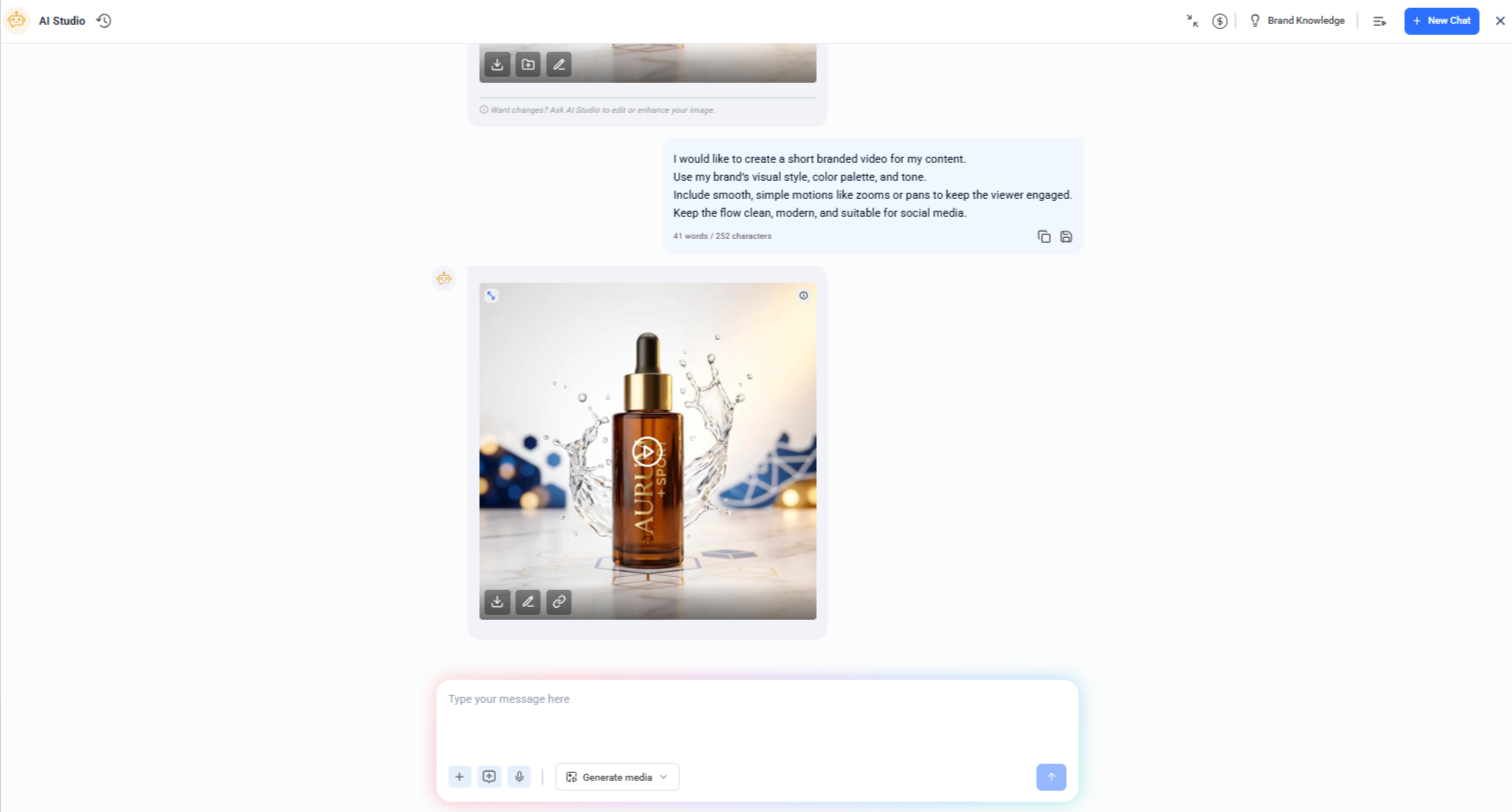
With tools like ContentStudio’s text-to-video feature, this process becomes even more seamless. You can take a piece of written content—such as a blog post, social media caption, or marketing script—and instantly convert it into a visually engaging video complete with scenes, transitions, and platform-ready formatting.
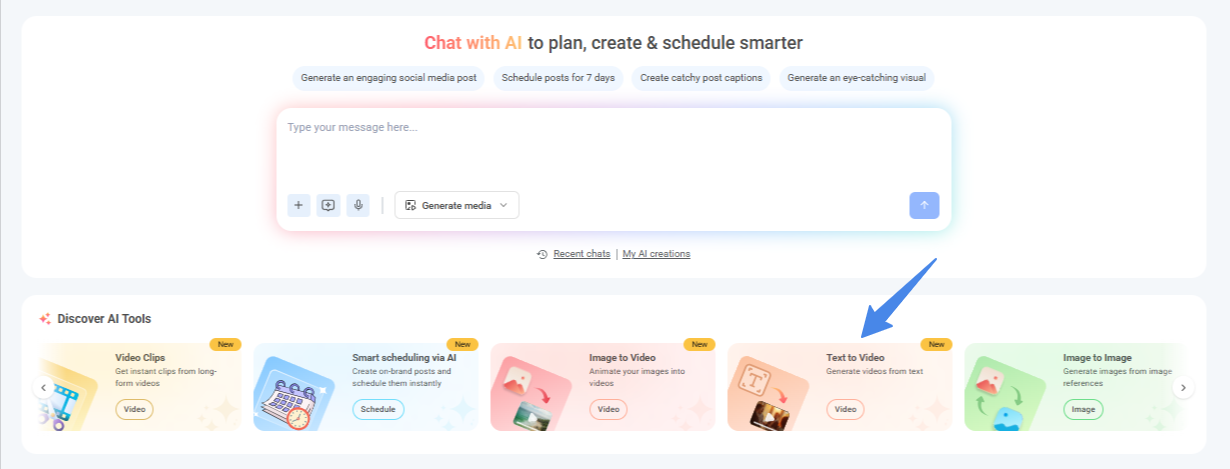
This capability is especially valuable for marketers who want to quickly repurpose written content into video for social media, ads, or short-form platforms. Rather than creating videos from scratch, teams can scale video production by turning existing content into dynamic visuals that capture attention and drive engagement.
Below is how you can turn your text prompt into a high-quality product video using ContentStudio’s text-to-video generator.
4. Photo to video animation
Many brands already have rich photo libraries from past shoots, but those images often remain underused in marketing campaigns. With image-to-video AI, marketers can transform static product or lifestyle photos into engaging motion content without starting from scratch.
For example, tools like ContentStudio’s image-to-video feature make it easy to convert existing visuals into short videos designed for modern social feeds. A single product photo can be turned into a smooth zoom, pan, or even a subtle 3D-style motion effect, enhanced with text overlays and music. Even lifestyle images can gain natural movement that captures attention while still looking authentic.
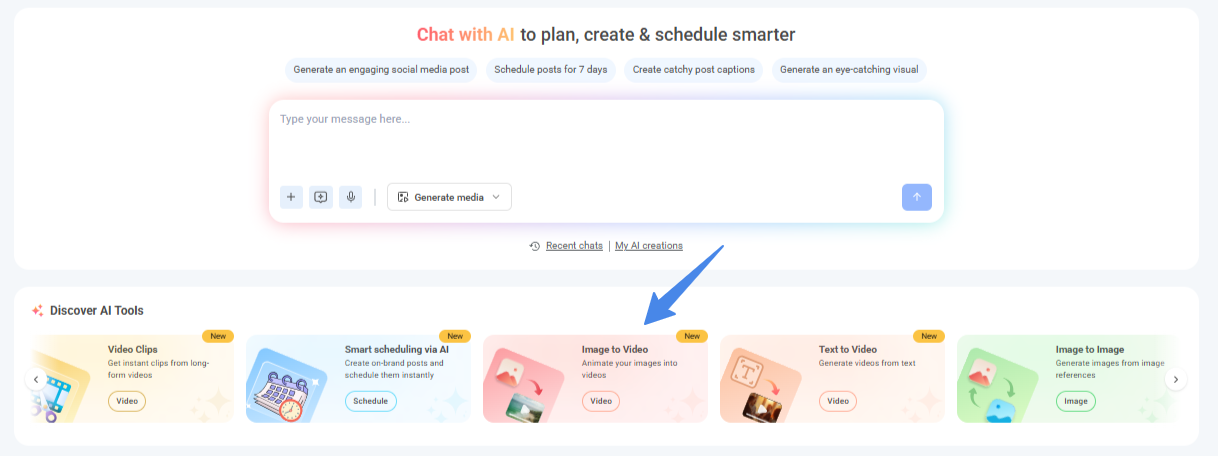
Inside ContentStudio, you can upload an image—or simply pick one from your media library and generate a video using premium AI models. Marketers can quickly customize key elements such as aspect ratio, duration, resolution, and visual style to match the platform they’re publishing on.
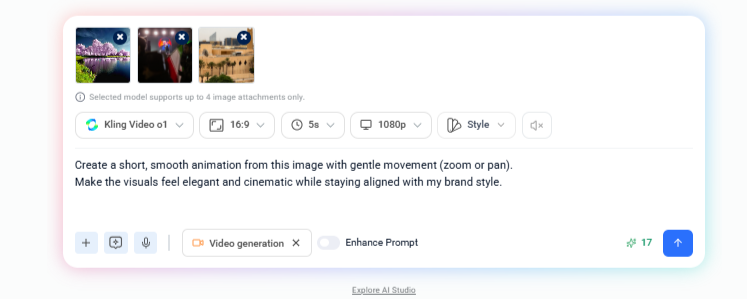
This approach is especially valuable for catalog-driven businesses like fashion, e-Commerce, or home décor brands, where multiple product images already exist. Instead of investing in new video shoots, teams can repurpose existing visuals and turn them into scroll-stopping clips ready for Reels, Shorts, and video ads.
5. AI voiceovers and multilingual video localization
AI voice libraries now cover dozens of languages and accents with natural pacing and emotion, which is a major win for AI video generation in global campaigns. A brand can create one master video in English, then use AI to produce localized voiceovers and on‑screen text in Spanish, German, Arabic, and more.
This approach means:
- No need to book studio time or manage many different voice actors
- Faster rollout of new offers across regions
- Consistent tone and messaging across markets
This matters for e commerce brands shipping worldwide and for SaaS companies selling in many regions. Teams shorten the gap between a new offer and a fully localized video launch, while keeping branding aligned.
6. AI generated UGC style ads for e commerce brands
AI is powering the rise of interactive and shoppable videos, especially in social commerce. Brands can embed product tags, clickable links, and instant checkout options directly within AI-generated videos. This trend is particularly important for e-commerce, where videos can drive immediate purchasing decisions.
Previously, user‑generated‑content style ads used to depend on finding the right creator, sending product samples, and waiting for edits. Now, AI video generation can mimic that casual talking‑to‑camera feel at scale.
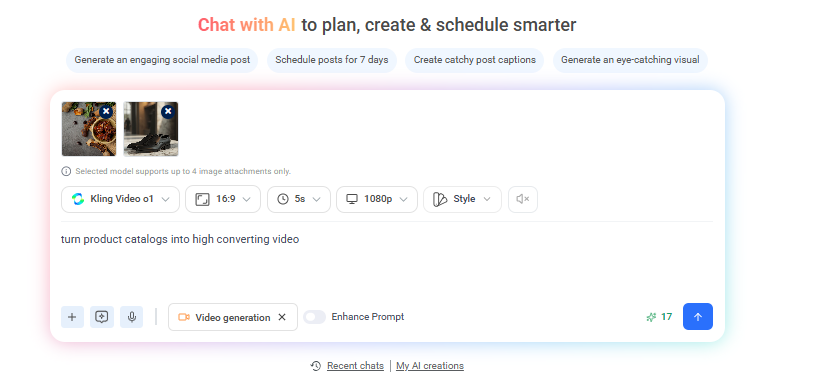
The model then builds a script and visuals that feel like a customer review or unboxing. These ads blend into feeds, which often leads to better watch time and clicks than stiff studio footage. Direct‑to‑consumer brands are stacking many AI‑generated UGC style ads and rotating them across paid social, which helps them keep creative fresh without constant shoots.
7. AI video clips for internal communications and training
Not every use of AI video generation is public facing. HR, learning, and internal comms teams are turning policies, onboarding checklists, and process docs into short explainers. These clips use simple visuals and clear narration, which helps new hires absorb information faster than long PDFs.
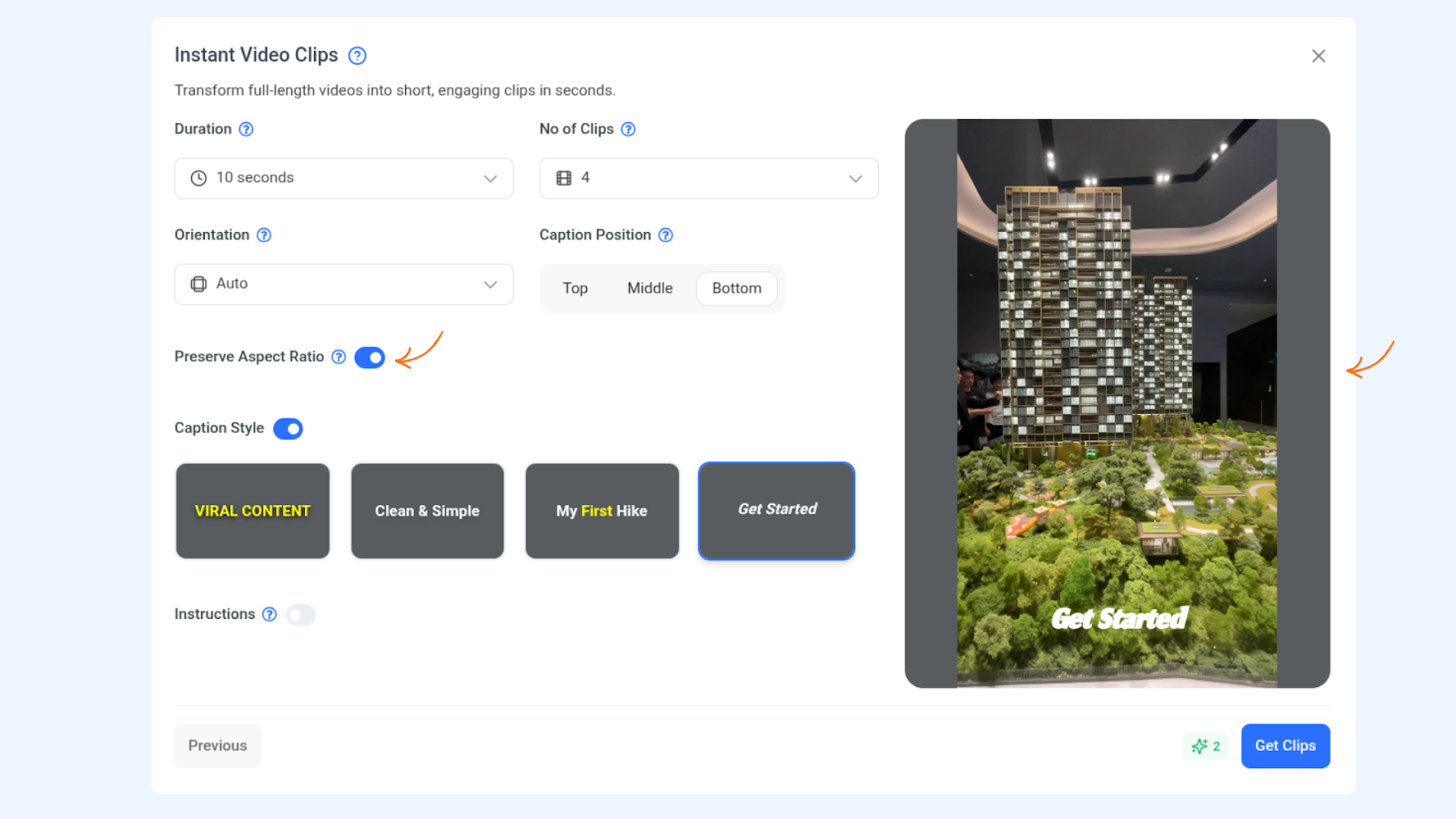
It’s easier to do with ContentStudio’s video clipping feature.

For large or remote teams, this kind of content helps by:
- Keeping key messages consistent across offices and time zones
- Freeing managers from repeating the same walk‑throughs in meetings
- Making updates easy when a process changes
Managers can refresh a long training video into short clips whenever they need, without calling a production agency. Internal videos may not boost followers, but they save hours of meeting time and reduce confusion across departments.
8. Native audio generation and cinematic soundscapes
Another growing trend in AI video generation is native audio. Instead of adding stock music and simple sound effects after the fact, advanced models build the full sound bed at the same time as the visuals. They can create dialogue, ambient noise such as traffic or birds, and a light score that matches the mood of the scene.
For example, models such as Veo 3.1 can generate videos where the audio naturally builds with the visuals, creating a more immersive and cinematic feel from a single prompt.
Platforms like ContentStudio are beginning to incorporate access to advanced AI video models that support richer audio generation as part of the creation process. This means marketers can generate videos where visuals and sound are designed together rather than pieced together afterward.
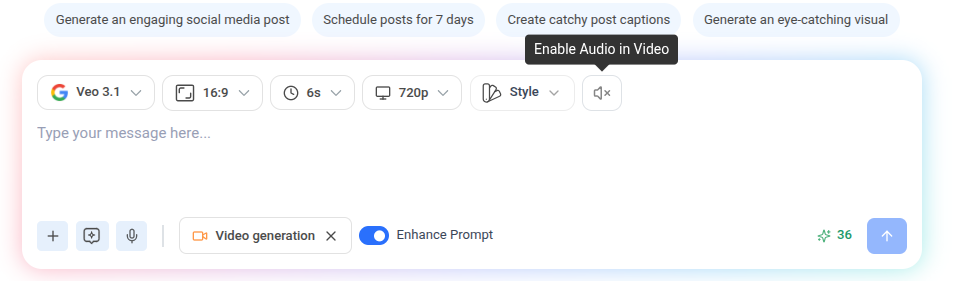
For brand stories, product films, or explainer videos, this means a richer feel from a single prompt. Teams no longer have to:
- Search through huge music libraries
- Worry about separate licenses for each track
- Spend time syncing sound manually to visual beats
The result is audio that fits the story on screen while cutting down editing time.
9. AI-enhanced video editing and post-production
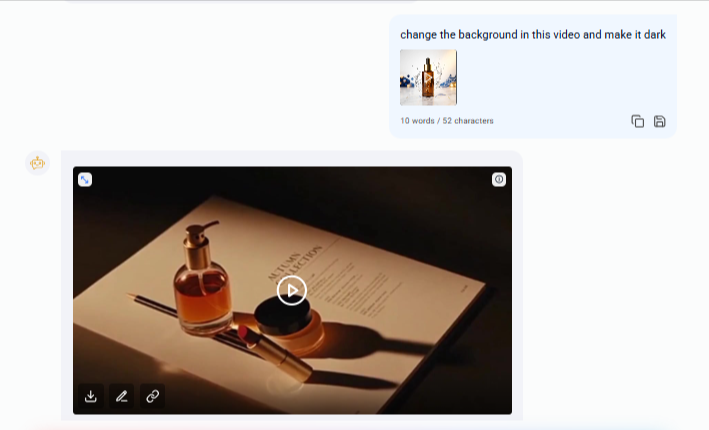
Beyond generating videos, AI is also transforming editing workflows. Tools can now automatically adjust lighting, remove unwanted objects, reframe shots, and enhance visuals during post-production. Major media companies are increasingly adopting AI to streamline video editing processes and improve production efficiency.
Major media companies and marketing teams are increasingly adopting AI-powered editing to streamline production and maintain a faster content pipeline.
Platforms like ContentStudio make this process more accessible by combining video creation and editing in one place. After generating a video, marketers can quickly refine it for publishing, whether that means adjusting the aspect ratio for platforms like Reels or Shorts, trimming clips, or preparing content for different social channels. This allows teams to move from idea to publish-ready video much faster, without relying heavily on complex editing software or long post-production cycles.
10. Real-time collaboration and multiplayer AI video editing
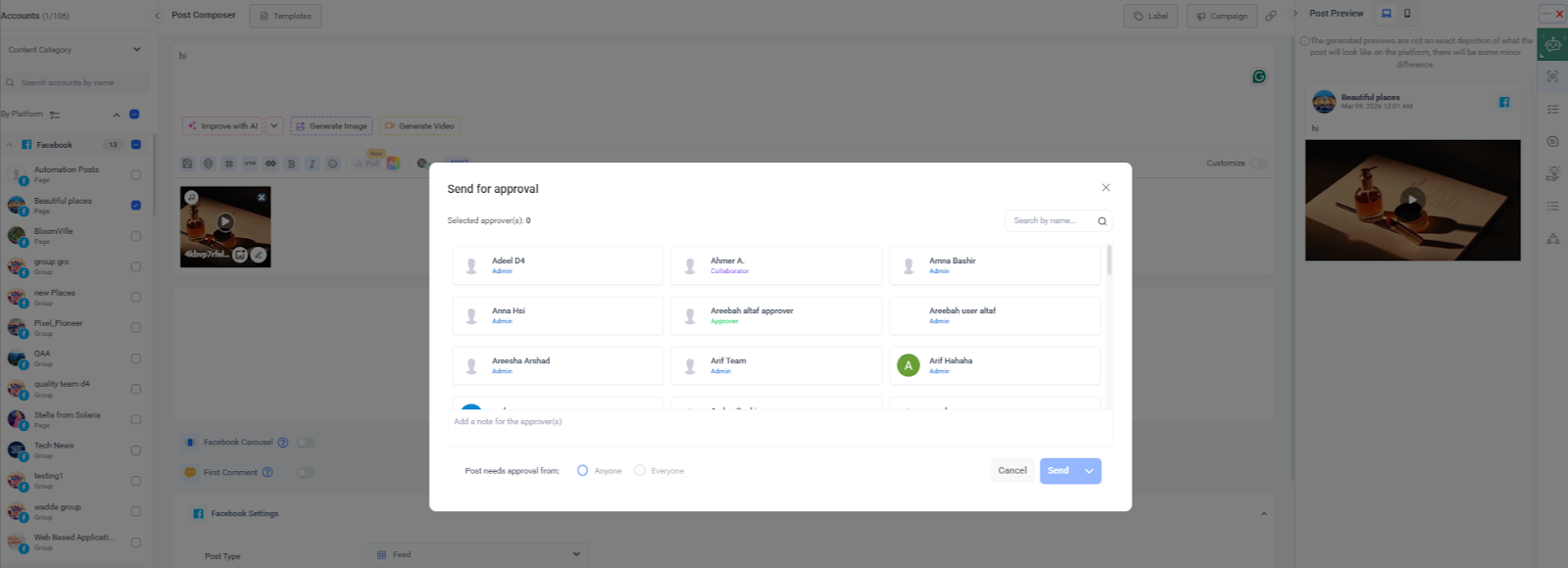
Traditional video projects often bounce between editors, managers, and clients through long email chains. New platforms tied to AI video generation are moving toward real‑time collaboration instead. Multiple people can review a project at once, suggest prompt tweaks, change scenes, or adjust timings inside the same browser window. This mirrors how teams already work in shared documents and slides.
For agencies and brand teams running many AI video tests each week, this kind of multiplayer editing shortens review cycles and reduces version mixups. When this collaborative layer connects with a planning tool like ContentStudio, teams get both fast creation and smooth coordination, all visible from a shared content calendar.
In 2026, AI video generation is no longer just a productivity tool; it’s becoming a core component of modern content strategy. From personalized advertising and social media content to automated editing and localization, these trends show how AI is reshaping video creation and opening new opportunities for marketers to scale impactful content faster than ever.
How to stay ahead of AI video generation trends

AI video generation tools move fast, so the goal is not to chase every new feature but to build a system that keeps a team informed and ready to test.
Start by tracking what performs well in your space. Content discovery tools help here, and ContentStudio’s Discovery module is designed for this kind of research, surfacing trending videos from YouTube and Dailymotion along with engagement data. Watching these patterns shows which hooks, lengths, and styles you should try next with your own AI video efforts.
Next, fold AI video into a clear content calendar instead of treating it as a side project. Plan a mix of:
- Short social clips
- UGC style ads
- Training and internal pieces
- Experiments such as photo to video or new voice styles
Use multichannel scheduling in ContentStudio to line up posts across Instagram, TikTok, LinkedIn, and YouTube, so each AI‑generated video appears at the right time on the right network. Then rely on analytics to see which formats drive watch time, clicks, and conversions, and adjust your mix based on that data.
Finally, focus on the workflow around AI video generation, not only the clip itself. Strong captions, smart posting times, and smooth client approvals often decide whether a video performs or stalls. ContentStudio brings captions, planning, publishing, reporting, and approvals into one workspace, which cuts down on busywork and app switching. That leaves more time for teams to try new use cases such as multilingual localization or personalized video and to double down on what actually moves the needle.
Conclusion

AI video generation is not a future idea; it is already reshaping how brands, agencies, and creators plan and ship content in 2026. From text‑to‑video social clips and UGC style ads to personalized campaigns, training explainers, and rich soundscapes, the top trends open many ways to show up in front of the right audience faster and at lower cost. Teams that understand these patterns and act on them will stand out in crowded feeds.
Making the video is only half of the job though. Planning topics, writing captions, timing posts, routing approvals, and reading the numbers are just as important. That is where ContentStudio comes in, with AI‑powered caption writing, smart content discovery, multichannel scheduling, deep analytics, and built‑in client workflows that fit neatly around AI video generation. If the goal is to turn a growing pile of AI clips into steady, measurable growth, it is worth exploring how ContentStudio can power the full content engine behind them.
FAQs
What is AI video generation?
AI video generation is the use of artificial intelligence to create videos from text prompts, scripts, or images. The system writes a script, chooses or generates visuals, adds a voiceover and music, and edits everything into a finished clip. This removes most technical barriers, so marketers can produce more video with less effort.
What are the most popular use cases for AI video generation in marketing?
Common marketing uses include short social videos, UGC style ads for e commerce, product demos, how‑to explainers, internal training clips, and personalized outreach campaigns. In each case, AI video generation cuts production time and cost while making it easier to test many creative angles. These are the same trends covered in the list above.
How can I manage and distribute AI generated video content effectively?
Managing AI video at scale works best with a central content hub. A platform such as ContentStudio lets teams schedule videos across channels, generate strong captions with AI, publish to all key networks, and track performance in one dashboard. Client approval workflows and team collaboration features keep AI video generation organized from idea to report.