Knowing the best times to post Reels on Instagram in 2026 can be the difference between a Reel getting lost in your Instagram feed or actually being seen. Instagram’s algorithm still cares about timing, but what really matters is when your audience is online and ready to engage.
As user behavior continues to shift, posting “whenever” just doesn’t cut it anymore. This guide breaks down when Reels perform best, why timing impacts reach and engagement, and how to choose posting times that work for your audience—not just generic averages. If you want your Reels to get more views, saves, and shares, starting with the right timing is key.
How do Instagram reels work?
It’s been a few years since the launch of Reels, and more and more users are trying this feature out.
Reels are simple to create. You can upload a video from your gallery all at once or in clips and record a Reel using your Instagram camera. Moreover, you can edit your Reel to add effects, audio, and text.
Reels are Instagram’s creative response to TikTok’s video content. You can tell how quickly they’ve become a much-loved content type, given they now have a separate feed on Instagram.
Related Read: Instagram Reels Vs. TikTok
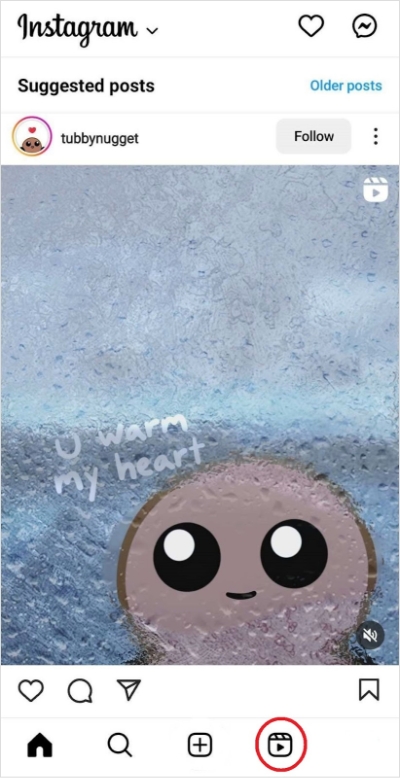
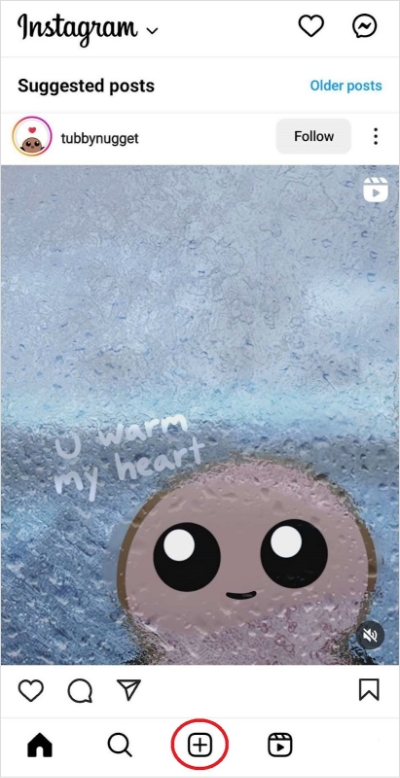
To create a Reel, click on the ‘+‘ sign on Instagram and then select ‘Reel.’
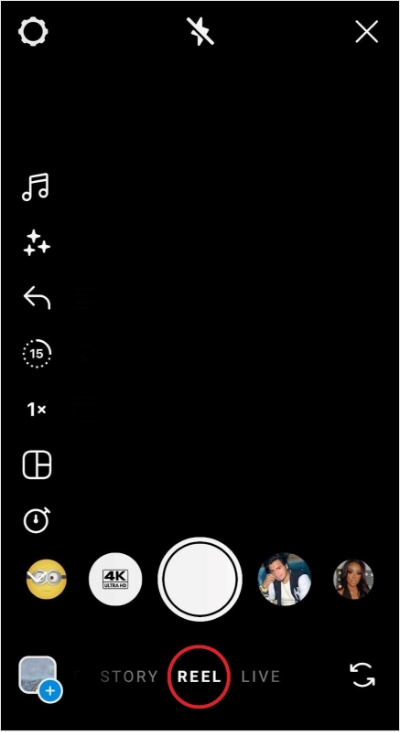
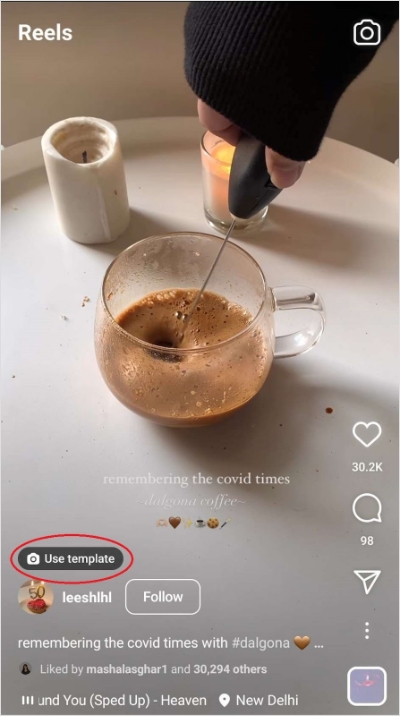
You can also make your Reel using another user’s template. To do so, tap ‘Use the template,‘ an option just above the username when a user’s Reel has been made in clips.
Remember: Instagram’s algorithm pushes relevant, engaging, and recent Reels. In other words, it shows users videos based on the type of content they engage with, the accounts they interact with, and how often they scroll.
So, if you want your Reels to catch eyeballs, post creative content frequently. Also, ensure you work on your overall Instagram engagement rate and post content when your audience is active.
Instagram Marketing
Schedule your Instagram posts, Reels, and Stories, and get recommended best time to publish for maximum engagement.
Get Started for FREE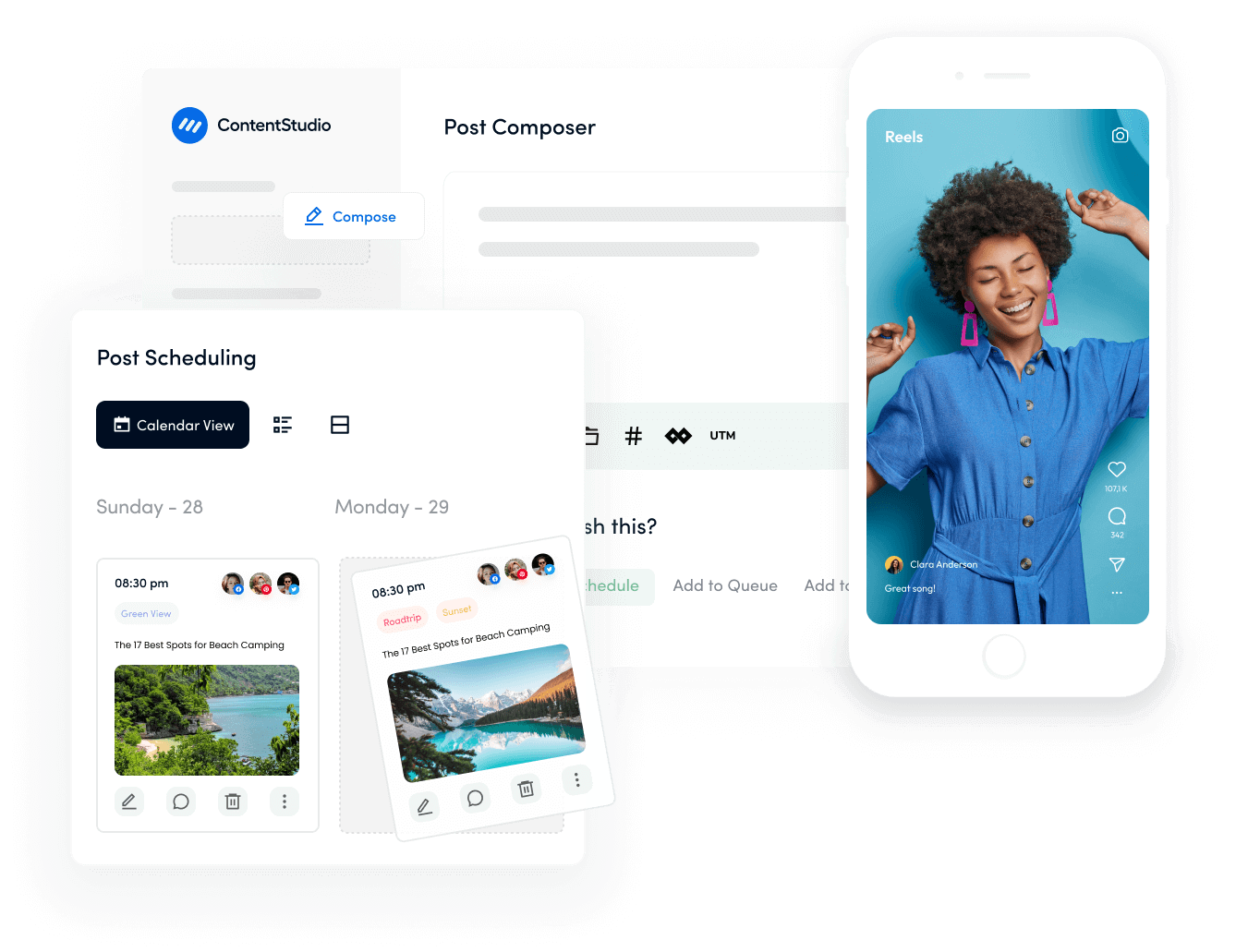
When to post on Instagram
Knowing when to post on Instagram matters just as much as what you post. Even the best content can underperform if it goes live when your audience isn’t active. Instagram’s algorithm prioritizes early engagement, so posting at the right time helps your content get likes, comments, saves, and shares quickly—signaling the platform to show it to more people.
In general, Instagram users tend to be most active during morning check-ins, lunch breaks, and evening scroll time. Weekdays often perform better for educational, business, and creator content, while weekends can work well for entertainment, lifestyle, and casual posts. That said, there’s no single “perfect” time that works for everyone.
The most reliable approach is to start with general best-time guidelines, then refine them using your own data. Check Instagram Insights to see when your followers are online, test different posting times, and track which posts get the strongest engagement. Over time, you’ll uncover posting windows that consistently work for your audience—helping you reach more people without posting more often.
Best days to post on Instagram in 2026
While you should post consistently, not all days are created equal. In 2026, the “Mid-week Peak” has solidified as the gold standard for engagement, while weekends have shifted toward “low-volume, high-intent” browsing.
1. Best time to post on Instagram on Monday
Contrary to the “Monday Blues” myth, Monday is actually a powerhouse for early morning reach.
- The Trend: People check their phones immediately upon waking up on Mondays to “catch up” on the weekend.
- Strategy: If you post between 5:00 AM and 7:00 AM on Monday, you catch users before they enter their first meeting of the week.
2. Best time to post on Instagram on Tuesday
Tuesday is the most reliable day for B2B and professional brands.
It is known for the highest “saves” and “shares.” Users are in a productive mindset and more likely to save valuable information for later.
3. Best time to post on Instagram on Wednesday
Wednesday remains the #1 best day to post on Instagram globally.
- Why it works: By Wednesday, users have settled into their weekly routine and are actively seeking “micro-breaks” to escape the mid-week workload.
- The data: Engagement rates on Wednesdays are consistently 15-20% higher than on any other day.
- Best content: Educational Reels, industry tips, and “Day in the Life” carousels.
4. Best time to post on Instagram on Thursday
Along with Tuesday, Thursday is the second most reliable day for B2B and professional brands.
Thursday sees a shift toward “Weekend Anticipation.” Engagement spikes in the late afternoon (3:00 PM – 5:00 PM) as people begin to mentally check out of work and browse for lifestyle or shopping inspiration.
5. Best time to post on Instagram on Friday
Friday is a high-traffic but low-attention day. Users are active but distracted. They want quick, snackable entertainment.
Pro tip: This is the best day for sales and promotions. People are in a “spending” mindset as they head into the weekend.
6. Best time to post on Instagram on Saturday & Sunday
Saturday is consistently the worst day to post for reach, but Sunday evening is a hidden gem.
Between 7:00 PM and 10:00 PM on Sunday, engagement surges. Why? People are “doom-scrolling” to avoid thinking about Monday morning. This is the perfect time for relatable, humorous, or motivational content.
Best time to post Reels on Instagram for 2026
The strategy for posting Reels has evolved. Because Reels are a high-reach format, you want to post right before major activity spikes so the algorithm can “seed” your video to a small group before the masses log on.
Here is the 2026 day-by-day breakdown of the best times to post Reels for maximum viral potential.
Best times to post Reels on Instagram on Monday
Mondays see a massive spike in early morning activity as people look for motivation or a distraction before starting their work week.
- Peak times: 3:00 AM, 10:00 AM, 10:00 PM
- Strategy: Post early (3 AM – 6 AM). You’ll catch the “first-thing-in-the-morning” scrollers and be at the top of the feed by the 10 AM coffee break.
Best times to post Reels on Instagram on Tuesday
Tuesday is consistently one of the best days for views. The “new week” energy is high, and users are actively looking for tips and tutorials.
- Peak times: 2:00 AM, 4:00 AM, 9:00 AM
- Strategy: Tuesday mornings are a goldmine. Post your most educational or high-value Reel before 9 AM to hit the workday peak.
Best times to post Reels on Instagram on Wednesday
Wednesday is the champion of engagement. Users are officially in the “mid-week slump” and spend more time watching long-form Reels to escape.
- Peak times: 7:00 AM, 8:00 AM, 11:00 PM
- Strategy: Don’t ignore the late-night window. A Reel posted at 11:00 PM Wednesday often goes viral by Thursday morning due to “lean-back” scrolling habits.
Best times to post Reels on Instagram on Thursday
Engagement begins to shift toward lifestyle and weekend planning.
- Peak times: 9:00 AM, 12:00 PM, 7:00 PM
- Strategy: The 12:00 PM (noon) slot is powerful here. It catches the lunch crowd and the early “weekend-mode” scrollers.
Best times to post Reels on Instagram on Friday
Friday has the highest volume of Reels posted but shorter attention spans.
- Peak times: 5:00 AM, 1:00 PM, 3:00 PM
- Strategy: Stick to the afternoon. After 3 PM, people are checking out of work and looking for entertainment, making it the best time for humor or trending audio.
Best times to post Reels on Instagram on Saturday
Saturday is typically lower for business content but high for personal/leisure Reels.
- Peak times: 11:00 AM, 7:00 PM, 8:00 PM
- Strategy: Avoid early mornings. Let your audience sleep in. Post around 11 AM for the “brunch-time” scroll or late evening for those staying in.
Best times to post Reels on Instagram on Sunday
Sunday evenings in 2026 are a major opportunity for “inspirational” and “relatable” content.
- Peak times: 7:00 AM, 8:00 AM, 4:00 PM
- Strategy: The 4:00 PM to 7:00 PM window is the “sweet spot.” Users are preparing for the week ahead and are highly active on their phones.
2026 Reels viral windows
| Day | Best Time #1 | Best Time #2 | Best Time #3 |
| Monday | 3:00 AM | 10:00 AM | 10:00 PM |
| Tuesday | 2:00 AM | 4:00 AM | 9:00 AM |
| Wednesday | 7:00 AM | 8:00 AM | 11:00 PM |
| Thursday | 9:00 AM | 12:00 PM | 7:00 PM |
| Friday | 5:00 AM | 1:00 PM | 3:00 PM |
| Saturday | 11:00 AM | 7:00 PM | 8:00 PM |
| Sunday | 7:00 AM | 8:00 AM | 4:00 PM |
Pro tip: In 2026, the “3-Second Rule” is non-negotiable. Regardless of when you post, if your Reel doesn’t stop the scroll in the first 3 seconds, the timing won’t matter.
Best times to post Reels on Instagram by industry
The “one-size-fits-all” approach to posting times is dead. In 2026, the Instagram algorithm looks for relevancy. If you post a B2B productivity tip on a Friday night, the algorithm may suppress it because users are in an “entertainment” mindset. Use these industry deep-dives to align your content with your audience’s mental state.
Retail & E-commerce
To maximize sales and visibility, retail brands should aim for the 10:00 AM to 2:00 PM window on weekdays, which perfectly captures the high-volume “lunch break” scroll. This is the peak time for window shopping on mobile devices as users look for quick hits of inspiration or retail therapy during work breaks. Additionally, Friday evenings at 6:00 PM are a critical “payday window” where purchase intent spikes as users transition into leisure mode for the weekend. For the best results, focus your Reels on “Shop the Look” or high-energy unboxing videos that make products feel tangible and accessible.
B2B & Software (SaaS)
The most effective strategy for B2B and SaaS brands is to utilize the “workday sandwich,” posting between 9:00 AM – 11:00 AM or 1:00 PM – 3:00 PM from Tuesday through Thursday. During these hours, professionals are in a productive, problem-solving mindset and are more likely to engage with educational content. It is best to avoid Mondays, when audiences are overwhelmed with catching up on emails, and Friday afternoons, when most users have mentally checked out for the week. To drive engagement, create Reels that feature “Quick Productivity Hacks” or “Behind the Tool” deep dives that offer immediate professional value.
Fashion & Beauty
Since fashion and beauty content is highly visual and recreational, it thrives when users are in a “lean-back” mindset. Daily peaks occur during the lunch hour (12:00 PM – 2:00 PM) and late in the evening between 7:00 PM and 9:00 PM, when audiences are looking for entertainment and aesthetic inspiration. Sunday evening is a notable secret weapon for this niche; as users prepare for the week ahead, they are highly receptive to “Outfit Planning” or “Weekly Reset” content. Focus on aesthetic transitions and tutorials that benefit from the more relaxed, high-retention scrolling habits of these time slots.
Real Estate
Real estate timing should be split between two distinct goals: educating sellers and attracting buyers. Mid-week, specifically Tuesdays between 11:00 AM and 2:00 PM, is the optimal time for educational content aimed at homeowners. However, for property listings and walkthroughs, Saturday morning at 9:00 AM is the “action window.” This is when active buyers are waking up and checking their phones to plan their weekend house viewings. Using cinematic property walkthroughs on Saturday mornings ensures your listings are top-of-mind exactly when your audience is ready to step out the door.
Food & Beverage
In the food industry, you are competing for your audience’s appetite, making timing a critical “craving catalyst.” You should aim to post roughly 30 minutes before traditional meal times—specifically 11:30 AM for the lunch rush and 5:00 PM – 7:00 PM for the dinner decision window. By appearing in the feed as hunger strikes, your Reel can become the direct reason a user decides what to order or cook. To enhance this effect, use trending audio paired with high-quality ASMR cooking sounds to trigger a physical craving response that leads to higher saves and shares.
Travel & Hospitality
Travel content is the ultimate form of digital escapism, and its best performing windows reflect when people are most likely to “dream.” Tuesdays between 10:00 AM and 12:00 PM are statistically strong for travel bookings, but the most intense engagement often happens on Sundays between 7:00 PM and 9:00 PM. During this time, users facing the “Sunday Scaries” turn to travel Reels to imagine their next getaway. Focus your content on “Hidden Gems” or “Budget Travel Hacks” to tap into this escapist mindset and provide a hopeful, high-value end to your audience’s weekend.
Industry comparison quick-check
| Industry | Best Day | Power Hour |
| Tech/SaaS | Tuesday | 10:00 AM |
| Healthcare | Thursday | 9:00 AM |
| Education | Wednesday | 4:00 PM |
| Non-Profit | Wednesday | 11:00 AM |
| Entertainment | Friday | 8:00 PM |
Pro Tip: If you are a Global Brand, always prioritize the time zone of your highest-spending demographic. If 60% of your sales come from New York, your “12:00 PM Lunch Window” must be 12:00 PM EST, regardless of where you are located.
Key factors to consider when choosing the best time to upload Reels on Instagram
1. Your audience’s active hours
The most important factor in choosing when to post Reels is knowing when your audience is online. Instagram rewards content that gets quick engagement, so posting during peak activity hours increases your chances of being pushed to more users. Use Instagram Insights to review follower activity by day and time, and focus on the hours when engagement is consistently high.
2. Type of Reel you’re posting
Not all Reels perform the same at the same time. Educational, how-to, and business-related Reels often do better during weekdays when users are in a learning mindset. On the other hand, entertainment, lifestyle, and trend-based Reels usually perform well in the evenings or on weekends when users are more relaxed and scrolling casually.
3. Early engagement signals
The first 30–60 minutes after posting are critical. Likes, comments, shares, and saves during this window signal Instagram that your Reel is valuable. Posting when your audience is active helps you gain that early momentum, which can significantly increase reach and discovery.
4. Consistency in posting schedule
Uploading Reels at consistent times builds a rhythm for both your audience and the algorithm. When people know when to expect your content, they’re more likely to engage. Consistency also helps Instagram better understand your publishing behavior, which can positively impact performance over time.
5. Time zones and audience location
If your audience is spread across different regions, time zones become an important consideration. Prioritize the time zone where most of your followers are located, or test multiple posting times to see which region responds best.
6. Testing, tracking, and optimization
There’s no universal best time that works for everyone. Test different upload times, track metrics like reach, engagement, and watch time, and adjust your strategy based on real results. Over time, this data-driven approach will help you identify the posting windows that consistently deliver the best performance.
Worst times to post reels on Instagram in 2026
Knowing when not to post is just as vital as knowing the peak windows. In 2026, the algorithm is more punishing toward “dead air” posts. If you upload during a low-activity trough, your Reel may fail its “initial seed test,” causing the algorithm to stop serving it before the day even begins.
1. The Saturday slump (The #1 worst day)
Saturday is consistently the lowest-engagement day. Users are active offline, making them 30–50% less likely to provide the “Saves” and “Shares” the algorithm requires to push content to the Explore page.
2. Late-night “Ghost Hours” (11:00 PM – 3:00 AM)
Posting when your primary audience is asleep kills your Engagement Velocity. By the time your followers wake up, your post is already “stale” (5+ hours old), and newer content will bury it.
3. The Monday morning “Meeting Crunch” (9:00 AM – 11:00 AM)
Avoid the start of the work week. Users are at peak focus, clearing inboxes and attending meetings. They may open the app, but they “quick-swipe,” signaling to the algorithm that your content isn’t holding attention.
Avoid these specific slots (local time)
| Day | The “Do Not Post” Window | Why? |
| Mon – Fri | 12:00 AM – 4:00 AM | Zero engagement velocity; content goes stale. |
| Monday | 9:00 AM – 11:00 AM | High work focus; low watch time. |
| Friday | After 4:00 PM | The “Weekend Fade”—users check out early. |
| Saturday | All Day | Lowest overall platform engagement. |
| Sunday | 10:00 PM – 3:00 AM | Sleep prep for the upcoming work week. |
Pro Tip: In 2026, the algorithm also deprioritizes “recycled” content. Regardless of the time, avoid Reels with watermarks (like TikTok logos) as they face an immediate reach penalty.
How to figure out the best time to post reels on Instagram?
Not only are Reels Instagram’s most engaging content type, but they’re also the platform’s fastest-growing feature. No wonder marketers and creators are jumping on the Reels bandwagon to make the most of them.
How can you find the best time to post Reels on Instagram for maximum engagement?
Luckily, we’ve five ways that you can use to figure out when you should be publishing your Reels on IG:
Start with A/B testing
If you’re new to Instagram Reels, A/B testing can help you find the best time to post Reels.
How do you go about it? Simply publish Reels at different times each day for a few weeks. For instance, publish a Reel at 4 pm Monday, then post it on Tuesday at 5 pm. Similarly, post an hour ahead the next day.
After a few weeks of posting like this, you’ll be able to see a pattern in the engagement you’ve been receiving. Jot down the times when your Reels receive the most engagement day-wise.
This way, you’ll know when you should post to get higher engagement.
One thing to remember, though: instead of deciding random times to post Reels for A/B testing, pick times when your audience is likely to be active.
For instance, if you’re targeting teens, avoid posting during the hours they’re at school. Instead, post between 4 pm to 8 pm on weekdays. On the other hand, if your target audience comprises young mothers, you may want to post midday when their children are at school, and they may have time to check Instagram.
At the end of the day, when you should post depends on when your audience is likely to be using Instagram. This looks different from industry to industry.
A/B testing may be a reliable method of finding the best time to post Reels, but it is inconvenient. With changing audience schedules and social media algorithms, you may need to conduct such testing often to track when you should post. Unfortunately, this can be both time-consuming and tedious.
Dive into Instagram analytics
If you’ve been religiously posting Reels, but only a few have received higher engagement, check out in-app analytics to up your game.
Instagram’s in-app Analytics can give you solid insights into when your audience is most active. Moreover, these insights can also help you see which type of content your audience is interested in watching.
But while using Instagram’s analytics to find the times you should post is more convenient than split testing, it does have some conditions.
You see, insights for Reels are only available if you have a Business or Creator account, and Analytics are only for some user accounts.
Also, insights are only helpful if you’ve been posting for a while. If you’re new to Reels, you may have to consistently create Reels content for the app to give you valuable data.
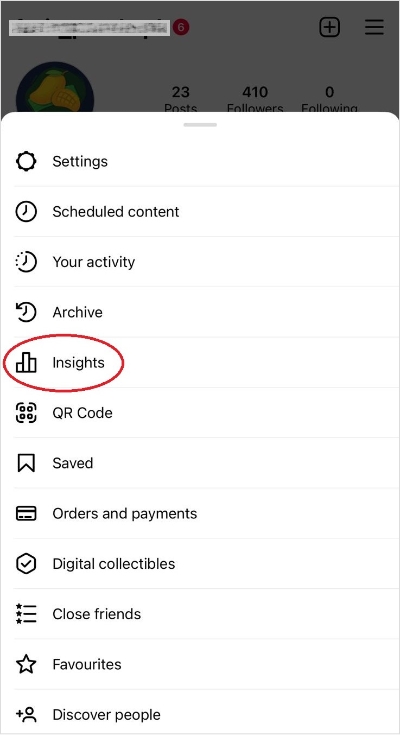
You can find insights for your account by clicking on Insights, an option available right on the profile of business or creator accounts. If it’s not there, click on the three lines at the top-right corner, and you’ll find Insights for your account there.
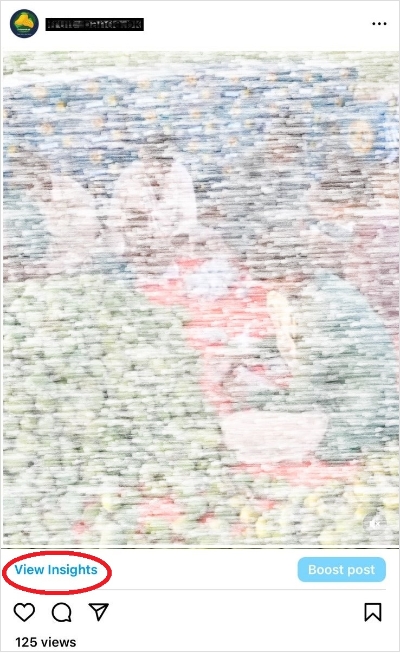
To view Analytics for your Reels specifically, go to your profile and the Reels tab. Tap on the Reel you want to view insights for. There, you’ll find the View insights option. Click on it to find the views, plays, likes, comments, shares, and saves of that particular Reel.
Now keep note of the Reels that receive the best engagement and at what times you’ve posted them.
These are the times you should ideally post when your audience is active and interacts more with your content.
Social Media Analytics
Fine-tune your social media strategy for success with in-depth analytics and white-labeled reports.
Get Started for FREE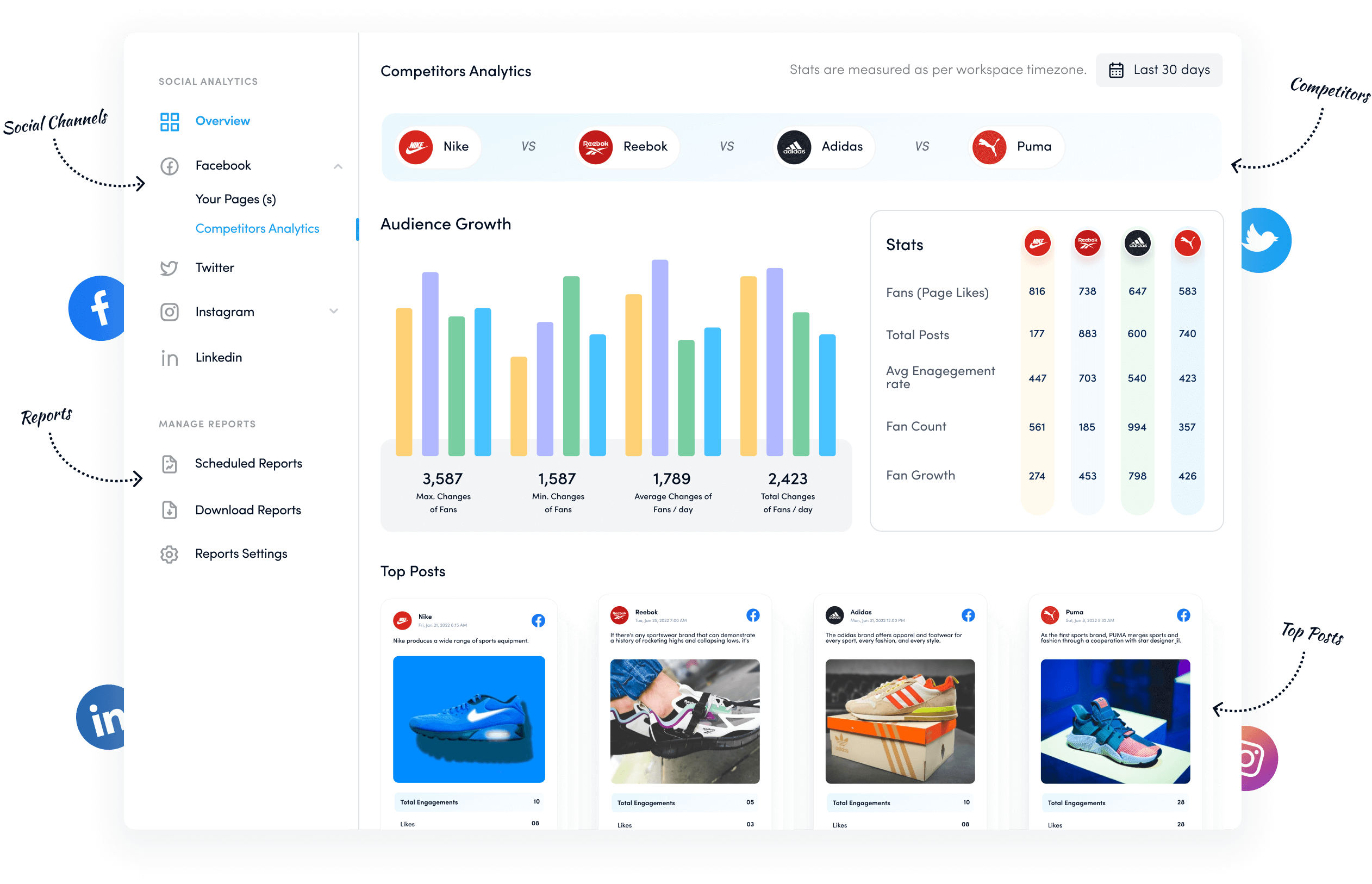
Study your competition
Analyzing your competitors‘ actions is another great way to devise your Instagram content strategy.
Here’s what you can do:
- Make a list of your competitors.
- Note down their most engaging posts.
- Track their likes and comments to determine which of their Reels have garnered the most engagement.
From then on, watch the days they posted their best-performing Reels.
However, this method has a drawback — you can only see the date a Reel is posted, not the exact time.
But this is no reason not to use this tactic to learn the best time to post on Instagram Reels. You see, an easy way to find the exact times your competitors post their most engaging Reels is by installing the Exact Time Viewer for Instagram chrome extension.
Use social media management tool like ContentStudio
Now for the most time savvy to post Reels when your audience is active: use ContentStudio.
ContentStudio’s set-and-forget content publishing feature takes all the manual work off your plate and makes it easy for you to post when your audience is likely to engage.
All you’ve to do is to connect your Instagram account with the tool and schedule a post using it.
Once you queue a post and are ready to set a time to schedule it for posting later, you’ll have the option to post it at the AI best time to post.
Tapping on this option will open up a heatmap that shows you the times when your audience engages with your content the most. This way, you can schedule your Reels to post at the most suitable times.
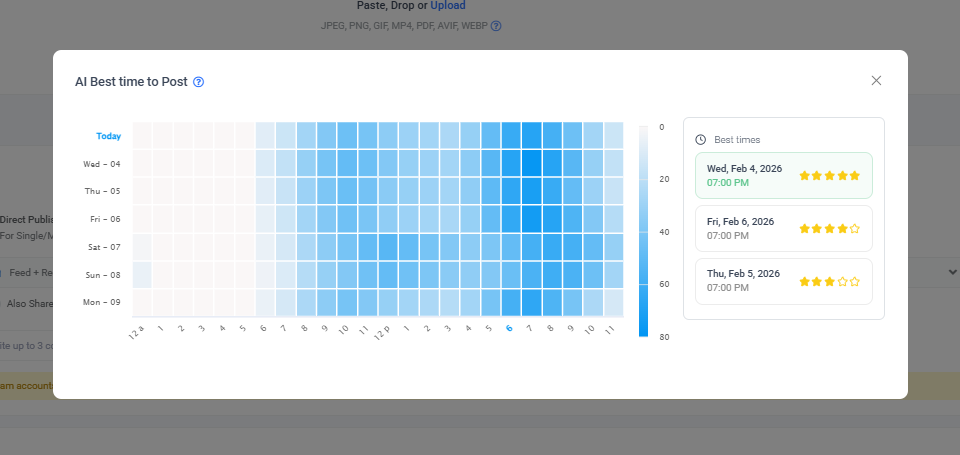
The best part? This heatmap monitors your activity constantly and accordingly changes the recommended best times.
One thing to remember though: ContentStudio’s scheduler can only recommend the best posting times when you’ve published a couple of Reels using the tool. Because this is the only way it gets a chance to analyze when your audience is most interactive automatically.
Post when you do on other social media accounts
For those of you who are just starting with Reels and don’t have much data to rely on, here’s another super simple way to find the best times to post videos on Instagram.
Look at when your audience engages best on other social media accounts.
For example, if you have an account on TikTok, you can replicate your most engaging times to post on TikTok for posting Reels.
You can start this way, and once you have a couple of Reels on IG, use Insights or ContentStudio to refine your posting schedule further.
Also Read: What’s the Best time to post on Instagram?
How to schedule Instagram reels with ContentStudio?
Whether you’re a social media manager, marketer, or creator on the ‘gram, pre-scheduling your Reels for the week can reduce your midweek workload.
Once you’re queued your Reels for the week or so in the ContentStudio scheduler, they’re automatically posted at your set time. Meaning: you don’t have to open your account exactly when your audience is active if you’re busy yourself.
This helps you maintain a work-life balance and gives you the brain space to enjoy your holidays.
To schedule your Reels, you’ll first need to connect your Instagram account to ContentStudio. Once done, follow these steps:
- Click on Compose post and Social post, an option at the top right your ContentStudio app.
- Select the Instagram account you want to post from right beside the Post Composer.
- Select the Instagram settings from ‘Post type’
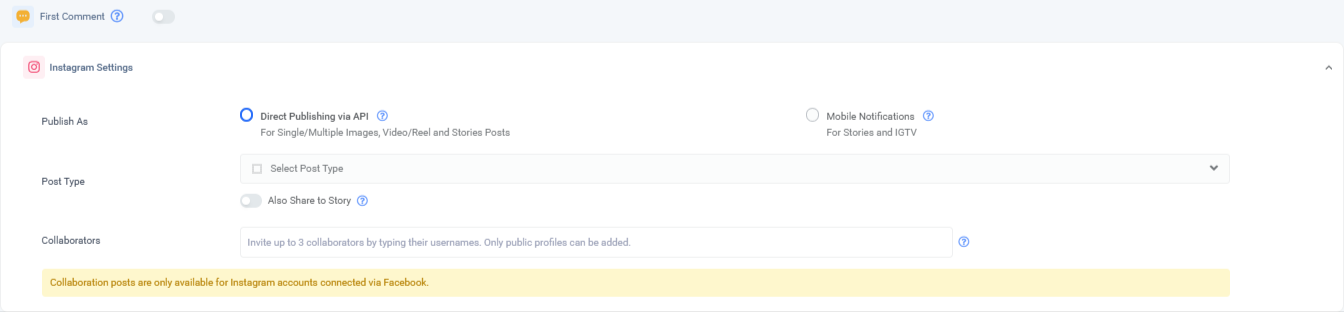
- In the Post Composer, select Upload or choose from Media library to schedule a Reel through ContentStudio.
- You can publish the post directly from the app once scheduled or receive a mobile notification at the set time for publishing the post from the two options given in front of ‘Publish As.’

- Right below ‘Publish As,’ you’ll find ‘Post Type.’ From here, select whether you want to post your video to only the Reel tab, the Feed tab, or the Reel and Feed tab.

- Finally, please choose whether you want to post the Reel at that moment, schedule it for publishing later, queue it, or save it as a draft.

Note: if you want to hit publish before a scheduled Reel is posted manually, you’ll need to download the ContentStudio app and turn on mobile notifications from within the app.
Six tips for maximum engagement on your Instagram Reels
Now that we’ve covered when and how you can post Instagram Reels, here’s a quick look at six tips you can use to increase engagement to your videos on IG:
1. Keep user experience top of mind
Instagram wants your Reels to look as native as possible. Means: you need to ensure your videos are of the right size and shot specifically for Instagram. So, your Reels should be in the 9:16 ratio to impress Instagram’s algorithm.
Moreover, you shouldn’t upload a TikTok video as an Instagram Reel.
When you do this, your Reel is published with a TikTok watermark, which is quite off-putting to Instagram, so much so that it says it isn’t going to recommend such Reels in the Reels tab.
So, your best bet is to create Reels with Instagram in your mind rather than publishing any horizontal or unclear video as a Reel on the gram.
In other words, prioritize video quality — publish high-quality videos that aren’t blurry or difficult on the eye.
2. Create a custom thumbnail for your reels
When publishing Reels to your feed, you’ve two options: let Instagram select the thumbnail or pick a custom thumbnail.
A pro tip is always to select a custom thumbnail. You can either upload a thumbnail or pick a frame from the video you upload. The former is more favorable here as it allows you to have a more coherent Instagram grid and convey the video’s gist if you want to.
Look at how Solid Starts on Instagram has created custom thumbnails with text explaining what each Reel is about.

3. Include a call-to-action
To increase engagement, you can either have a call-to-action in the caption or include one at the end of the video.
The benefit? An effective CTA helps increase engagement by encouraging people to respond. For instance, ask a question in the caption to urge your audience to reply in the comments.
Go Wander Dubai’s Instagram page is a good example here. They typically ask a question in their captions, eliciting a response from viewers.

4. Ride the trend bandwagon
Have you noticed a trend on your explore page that you can jump on? Go for it.
Adding a unique twist to a trend encourages people to watch your video and engage with you.
You don’t just have to limit yourself to trending ideas; you can also follow Instagram Reels trends regarding the audio or effects you add.
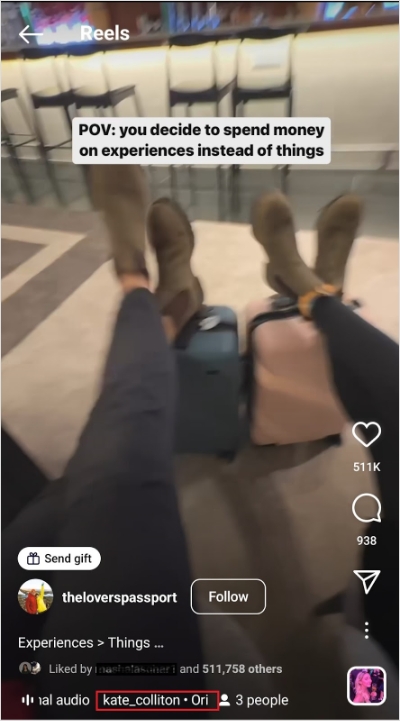
Check out how @theloverspassport has followed a travel-niche trend and used trending audio in their Reel:
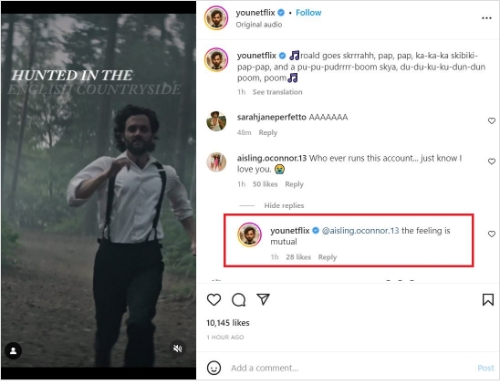
5. Get chatty in the comments section
Comment replies are a great way to make your audience feel like you value their opinion and/or questions.
Responding to the comments you receive on your Reels pushes your Reel’s engagement further and also encourages people to comment more often.
Just remember to respond meaningfully rather than just replying hurriedly with emojis. Also, always be polite and ethical rather than losing your cool when you receive negative comments.
Learn from Netflix hit YOU’s Instagram page. They also know how to keep the audience hooked on the gram by engaging with them in the comments section.
Related Read: How to Positively Handle Negative Comments on Social Media?
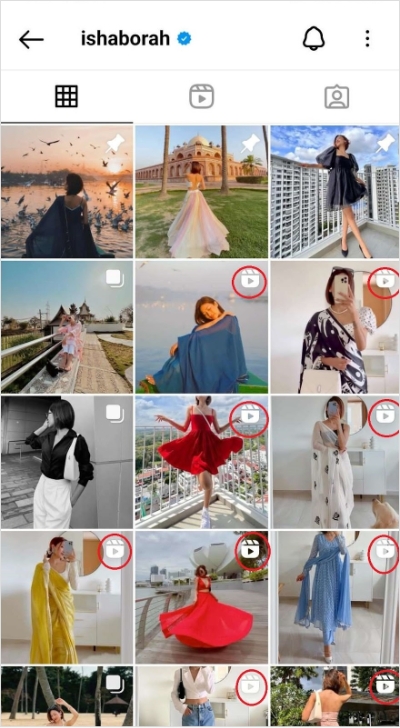
6. Post Reels frequently
Last but not least, post consistently. Since Instagram currently gives Reels a better chance at higher viewership, it’s a good idea to post more Reels than other content types.
Styling influencer Isha Borah’s consistency in posting reels has undoubtedly worked wonders for her, as she’s recently earned herself a blue tick.
Post Instagram Reels at optimal hours for high engagement
Posting your Reels when your audience is active is a great way to increase Instagram engagement.
And while you can analyze your past Reels performance, your competitors’ videos, or what works for you on other social networks, posting through ContentStudio is the easiest way to publish video content when your audience is likely to interact.
Along with making sure you schedule your posts at the best times, ContentStudio enables you to schedule posts for automatic posting shortly, streamlining your workflows.
So, what are you waiting for? Join ContentStudio today to schedule your posts for maximum ease and engagement.
Also Read: Best time to post on Youtube
FAQs
1. What is the best time to post Reels on Instagram?
The best time to post Reels on Instagram depends on when your audience is most active. In general, mornings, lunch breaks, and evenings tend to perform well, but checking Instagram Insights gives the most accurate timing for your account.
2. Do Reels perform better on weekdays or weekends?
Reels often perform better on weekdays, especially Tuesday to Thursday, due to higher user activity. However, entertainment and lifestyle Reels can perform well on weekends, particularly in the evenings.
3. Does posting time really affect Reel reach?
Yes, posting time impacts early engagement. Reels that get likes, comments, and shares shortly after posting are more likely to be pushed by Instagram’s algorithm to a wider audience.
4. Should I post Reels at the same time every day?
Posting Reels at consistent times helps build audience expectations and supports algorithm performance. Consistency matters more than hitting a “perfect” time once.
5. How can I find the best posting time for my Instagram Reels?
Use Instagram Insights to analyze follower activity, test different posting times, and track engagement metrics to identify the timing that works best for your audience.